
SimCity Old Version Mod APK
ELECTRONIC ARTS

- Latest build
- Unlimited Money
- No downgrade
- No root

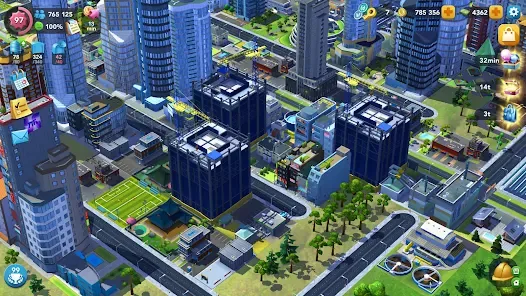

Screenshots from the current build. Older releases lose the content added since.
Before you go hunting for a SimCity old version mod apk, there is something that will save you the effort: Android refuses to install an older build over a newer one. You would have to uninstall first, which destroys the local city, and on a modified client that city cannot be restored from the cloud. This page covers what we host, why downgrading this particular game rarely achieves what people hope, and what genuinely fixes the four problems that send people looking. The current build is documented in the simcity buildit mod apk guide.
Which version this site hosts
We do not publish a SimCity old version mod apk. One build, kept current: version 1.81.1.14873346, for Android 7.0 and up, at 269 MB. We do not maintain a back catalogue of older releases.
That is a deliberate choice rather than an oversight. Old builds of an online connected game decay quickly, and hosting a shelf of them gives people something that looks useful and mostly is not, for the reasons below. When a newer build supersedes this one, we replace the file rather than accumulate versions.
Why Android blocks a SimCity old version mod apk
This is the practical wall, and almost nobody mentions it before you have already downloaded several hundred megabytes.
Every Android package carries a version code, an integer that increases with each release. The build discussed across this site carries version code 1080001. When you install a package, Android compares its version code against whatever is already installed, and if the incoming one is lower it refuses outright. The error is usually surfaced as a plain “App not installed”, which explains nothing.
The only way around it is to uninstall the current game first. That is where the real cost sits, because uninstalling takes the local save with it.
What you actually lose
- Your city. The save is local, and uninstalling removes it.
- Content added since that release. Buildings, regions and systems introduced in later updates simply are not in an older package.
- Compatibility with newer saves. Save formats change across major versions, and an older build generally cannot read a newer file even if you managed to preserve one.
- Any remaining online functionality. Servers move on. Older clients get rejected on protocol grounds as well as modification grounds.
- Fixes. Later builds include stability work, and the low memory improvements in recent releases are exactly what older devices need.
Why a SimCity old version mod apk is a dead end for this game
Three structural reasons, beyond the general ones.
The package format changed
The game ships as an app bundle now, split into a base package plus device specific packages, and an installer assembles them. Older releases predate that arrangement or use a different split layout, so guides written for one do not describe the other. We cover the current structure on the OBB and data page.
Server validation is version aware
Electronic Arts’ services check which client is calling, and that includes its version. An older client is turned away for being outdated in addition to being modified, so anything requiring a connection is doubly unavailable.
The Android floor has moved
The current build requires Android 7.0 as a hard minimum. People often chase an older release hoping it will run on an older phone, but the game’s requirements rose alongside its content, and a build old enough to support Android 5 is old enough to be missing years of the game.
How to check which version you have
- Open Android Settings, then Apps.
- Find SimCity BuildIt in the list and tap it.
- Scroll to the bottom. The version number appears there.
You can also check inside the game, usually under the settings or information panel. If the two disagree, trust Android, because that reads the installed package directly rather than a label the game prints.
Better answers to the four reasons people downgrade
Every request for an older build traces back to one of these, and in each case there is a fix that does not cost you the city.
“The update broke something”
Try clearing the app cache first, under Settings, Apps, Storage. That resolves a surprising share of post update misbehaviour without touching your save. If the problem is a crash at the loading screen, it is usually memory rather than the update, covered below.
“My phone cannot handle the new version”
Close background applications and reboot before concluding the device is too old. Recent releases actually improved stability on lower memory devices, so the newest build is often the better choice on weak hardware rather than the worse one. If the device genuinely cannot cope, an emulator on a computer removes the memory ceiling entirely, which the SimCity BuildIt for PC page covers.
“I preferred how something used to work”
This is the one no downgrade truly solves, because reverting the client does not revert the game’s balance decisions on the server side, and it costs you every subsequent improvement. Worth weighing honestly rather than assuming an old build restores a remembered experience.
“The new version will not install”
Almost never a reason to seek an older one. The usual causes are the Play Store version still being present, insufficient storage during the unpacking stage, or the installer being interrupted. All three are covered on the main guide and all three are fixable.
Download the current buildFree · 269 MB · Android 7.0 and upOne maintained version rather than a shelf of stale ones.
If you still want a SimCity old version mod apk
It is your device and your decision, so here is the honest procedure along with what it costs.
- Accept that the current city is being destroyed. There is no reliable backup path on a modified client.
- Uninstall the installed game completely.
- Confirm you have enough free storage, since the installer still needs working room.
- Install the older package and let it finish without interruption.
- Expect online features to be unavailable, and expect content added after that release to be missing.
Be cautious about where an old package comes from. Archives of outdated builds attract repackaged files precisely because fewer people verify them, and an older release will never receive a security fix again. We would rather tell you that than pretend the risk is zero.
Frequently asked questions
Do you host a SimCity old version mod apk archive?
No. We maintain one build, currently 1.81.1.14873346 for Android 7.0 and up at 269 MB, and replace it when a newer release supersedes it rather than accumulating a back catalogue. That is deliberate. Old builds of a connected game go stale quickly: their online features stop being accepted, their save formats become incompatible, and they never receive another security fix. A shelf of outdated packages looks helpful and mostly is not. If you specifically need an older release for a reason the current build genuinely cannot satisfy, the procedure and its costs are set out above, but read the downgrade restriction first because it affects everyone.
Why does the older version say app not installed?
Because Android refuses to replace a package with one carrying a lower version code. Every Android build has a version code, an integer that rises with each release, and the installer compares the incoming package against what is already present. If the new one is older, installation is rejected before it begins. The message surfaced is usually just “App not installed”, which explains none of that and sends people looking for a corrupt file that is not corrupt. The only way past it is uninstalling the current game first, which deletes the local save. On a modified client that save cannot reliably be recovered afterwards.
Will I lose my city if I downgrade?
Yes, and you should treat that as certain rather than likely. Downgrading requires uninstalling the current installation, which removes the local save along with it. On the Play Store version you could restore afterwards by signing back into a linked Facebook, Google or Electronic Arts account, but a modified client is frequently rejected by those servers, so that recovery path is unreliable at best. There is no export function and no save file you can copy somewhere safe without root access. If the city matters to you, the honest advice is not to downgrade at all, because no older build is worth an unrecoverable loss.
Will an older version run on my old phone?
A SimCity old version mod apk probably will not run as well as you expect, and possibly worse than the current one. The requirement rose alongside the content, so a build old enough to support very old Android is old enough to be missing years of the game. More importantly, recent releases included stability work specifically targeting lower memory devices, which means the newest build is frequently the better choice on weak hardware rather than the worse one. Before deciding your phone cannot cope, close background applications and reboot, since loading screen crashes are usually memory pressure rather than version incompatibility. If the device genuinely cannot manage it, an emulator on a computer removes the ceiling completely.
Can I keep two versions installed at once?
Not normally. Android identifies applications by package name, and two builds of the same game share one, so installing the second replaces the first rather than sitting alongside it. Some phones offer a dual app or app cloner feature that creates a second isolated profile, and some emulators support multiple instances, both of which can hold separate installations. Those work but each instance keeps its own entirely separate city with no way to move progress between them. If your goal is comparing an old build against the current one, the multi instance route on a computer is the least destructive way, since it avoids uninstalling anything on your phone.
Is an old version safer or less detectable?
No, on both counts, and the reverse is closer to true. Older clients are rejected by Electronic Arts’ services for being outdated as well as modified, so if anything they stand out more rather than less once they attempt a connection. Being offline is what actually removes detection risk, and that works identically on any version. On safety, an outdated build will never receive another security fix, and archives of old packages attract repackaged files precisely because fewer people bother verifying them. So an older release trades away content and stability for no security or detection benefit whatsoever.
How do I check which version I have installed?
Open Android Settings, tap Apps, find SimCity BuildIt in the list and open it, then scroll to the bottom where the version number is displayed. Most builds also show a version somewhere in the game’s own settings or information panel. If those two disagree, trust the figure Android reports, because it reads the installed package directly rather than displaying a label the game was compiled with. This matters when a download has been mislabelled, which happens often in this category, since the filename a site gives a package carries no authority at all over what the package actually contains.
What happens to my save when the build updates?
Within a minor update, normally nothing, and your city carries across untouched. Across a major version jump the save format can change, and an older save is not always readable by a newer build, which occasionally shows up as a city that fails to load or appears reset. Because there is no reliable cloud restore on a modified client, the safe habit is to treat every version change as a point where progress could be lost, and to decide whether you would accept that before installing. If you have a city you genuinely care about, keeping it on the unmodified Play Store version with a linked account is the only arrangement that truly protects it.
Conclusion
The honest position is that a SimCity old version mod apk solves fewer problems than it appears to. Android blocks the downgrade outright unless you uninstall first, uninstalling destroys a city you cannot reliably restore, and the older build then lacks the content, the fixes and the compatibility of the current one.
All four reasons people go looking have better answers. Clear the cache for post update misbehaviour, reboot and close background apps for performance, use an emulator if the device is genuinely too weak, and fix the install rather than replace it if it will not install. That is why we maintain one current build instead of a shelf of stale ones.
SimCity and SimCity BuildIt are trademarks of Electronic Arts Inc. Simcityapk.com is not affiliated with, endorsed by, or sponsored by Electronic Arts Inc. or Google LLC. All app names, logos and trademarks are the property of their respective owners. This site publishes information for educational purposes only. Modified applications are not supported by their original developers, so use them at your own risk. If you are a copyright holder and believe content here infringes your rights, please see our DMCA page.
Version Facts
| Hosted build | 1.81.1.14873346 |
| Older builds hosted | None |
| Downgrade allowed | No, Android blocks it |
| Uninstall required | Yes, to downgrade |
| Save survives downgrade | No |
| Cloud restore on mod | Unreliable |
| Minimum Android | 7.0 |
| Size | 269 MB |