
SimCity BuildIt Mod APK OBB and Data
ELECTRONIC ARTS

- Single file
- No data folder
- 85 packages inside
- No root
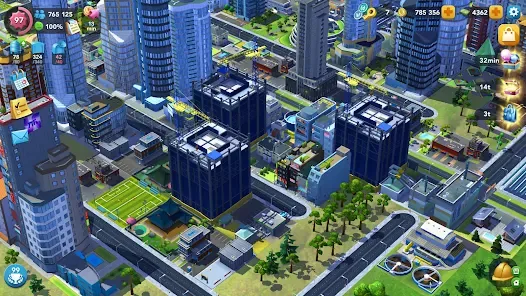

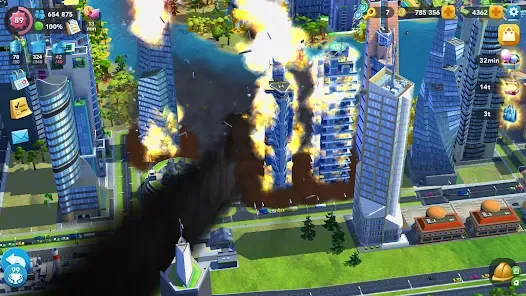
All of this renders from data packed inside the application itself, with no external folder involved.
There is no OBB file. That is the short answer, and it saves you a lot of wasted searching. People look for a SimCity BuildIt mod apk OBB because that is how large Android games worked for years, but this one abandoned that format. We opened the package and read its contents directly rather than guessing: it holds 85 separate components, none of which is an OBB, and every byte of game data sits inside the application itself. This page explains what the file really contains, where the data lives, and what the corrupted data error actually means. For the full build details, see the simcity buildit mod apk guide.
Why people look for a SimCity BuildIt mod apk OBB file
Searches for a SimCity BuildIt mod apk OBB come from a real history. Android imposed a 100 MB ceiling on APK uploads for a long time, and games are much larger than that. The workaround Google provided was the OBB expansion file: a separate archive you downloaded alongside the APK and copied by hand into a folder at Android/obb/com.package.name/. Install the small APK, drop the big OBB into place, launch the game.
That is why nearly every guide for a large mobile game from that era includes a copy the OBB folder step, and why people still search for one. The habit outlived the format.
Google replaced it with the Android App Bundle. Instead of one APK plus one giant data blob, the store now delivers a base package plus a set of smaller packages tailored to your specific device. Your phone receives only the processor code, the screen density artwork and the language it actually needs. Nothing gets copied by hand, and no OBB is produced at any stage.
What the SimCity mod apk OBB download actually contains
Rather than describe this generically, here is the real inventory read out of the file we host. The outer download is a 269 MB installer that carries a 264.8 MB archive, and inside that archive are 85 components:
| base.apk | 131.7 MB, the game and all its content |
| InstallPack.apk | 88.3 MB, additional packaged content |
| ABI packages | 2, arm64-v8a at 21.8 MB and armeabi-v7a at 18.6 MB |
| Screen density packages | 7, from ldpi through xxxhdpi |
| Language packages | 74 |
| OBB or data files | 0 |
That last row is the one worth sitting with. There is no .obb anywhere in the package, and no separate data archive of any kind. Anyone offering you a SimCity BuildIt OBB as a second download is offering something that does not exist.
Your device does not install all 85 pieces. It takes the base package, the one processor build matching its chipset, the one density package matching its screen, and your language. The rest are discarded, which is why the installed game occupies well under the 269 MB you downloaded.
Where the game data actually lives
Inside base.apk, in its assets directory: 111.8 MB spread across 2,181 files. That is the buildings, the map terrain, the vehicles, the audio and the interface artwork, all of it bundled into the application package rather than shipped alongside it.
You can see the structure in the asset paths themselves, which are organised by content area: map screen terrain, mountains and sea, special vehicles, audio, billboards and so on. This is precisely the content that would have lived in an OBB under the old model. It moved inside the package, and nothing about it needs your involvement.
Android/obb/ folder for this game. It will not be there, and its absence is not a sign of a failed install.SimCity mod apk tanpa data terkorupsi: what the error really means
A large share of the searches that bring people here are some form of “data corrupted”, including the Indonesian phrasing tanpa data terkorupsi, meaning without corrupted data. The error is real. The diagnosis attached to it is almost always wrong.
Because no data file exists, the problem is never a bad OBB, a mismatched data folder or a data archive that downloaded incorrectly. It is one of four things, and each has a straightforward fix.
The split installation did not complete
The installer hands several packages to Android in sequence. If it is interrupted partway, you end up with a base package installed and one or more of its required companions missing. The game launches into a state where it expects content that is not there, and reports data problems. This is by far the most common cause. Reinstall and let the installer finish without minimising it.
The download itself truncated
A connection that drops near the end leaves a file that looks complete in your downloads list but is short. The installer then fails partway with an error that sounds like corruption because functionally it is. Check the saved file is close to 269 MB before you open it. Anything meaningfully smaller did not finish.
Storage ran out mid install
The installer needs working room for both the compressed payload and the unpacked packages at the same time. When the device runs out, the install stops in an incomplete state rather than cleanly failing, and the result presents as corrupt content.
An older version’s files are still present
Upgrading across a major version while a previous installation’s data remains can leave the new build reading a save format it does not understand. Clearing the application’s storage resolves it, at the cost of the local city.
Installing correctly, with no data step
- Connect your existing city to a Facebook, Google or Electronic Arts account if you want to keep it, then uninstall the Play Store version.
- Free up around 600 MB. The installer needs headroom while both the compressed and unpacked forms exist together.
- Download the file and check the saved size is close to 269 MB before opening it.
- Open it and grant install permission to whichever app opened it.
- Let the installer place every component. It takes longer than an ordinary app because it is installing several packages, not one.
- Launch the game from your app drawer. Do not create any folder and do not copy anything. There is nothing to copy.
One download. No second file, no data archive, no manual folder step.
If you already have a SimCity mod apk OBB folder
Some people arrive looking for a SimCity mod apk OBB having already created Android/obb/com.ea.game.simcitymobile_row/ by hand, or having kept one from an old installation years ago. Delete it. It does nothing, the current game never reads it, and leaving stale content there occasionally confuses file managers and cleanup tools into flagging the game as broken.
The same goes for any file you were handed described as SimCity data. If it did not come from the single installer, the current build has no use for it.
Storage you actually need
| Download | 269 MB |
| Free space during install | Around 600 MB |
| After installation | Noticeably less, since unused packages are discarded |
| Growth over time | Cities and cached content add to this |
The gap between the download size and the final footprint surprises people who expect the two to match. It happens because your device keeps only the processor build, density artwork and language it needs from the 85 available.
Checking your install finished properly
Three quick signals, in order of how definitive they are:
- The game icon exists in your app drawer, separate from the installer icon. If only the installer is present, the process did not complete.
- It reaches the city view rather than stalling on the loading screen. A partial split installation typically fails here.
- Artwork renders at the right sharpness. Badly blurred or missing textures can indicate the density package did not install, though this is rare.
If any of those fail, reinstall rather than troubleshoot. A partial installation is not repairable in place, and reinstalling takes less time than diagnosing which of the 85 components went missing.
Frequently asked questions
Where is the SimCity BuildIt mod apk OBB file?
There is no SimCity mod apk OBB file, and that is not an oversight on our part. We opened the package and listed every component: it contains 85 items, and none of them is an OBB or a data archive of any kind. OBB expansion files were Google’s answer to an old 100 MB upload limit, and they have been replaced by the Android App Bundle format, which splits a game into a base package plus smaller device specific packages instead. Every byte of game content, 111.8 MB across 2,181 files, sits inside the base package. If a site offers you a separate SimCity BuildIt OBB download, it is offering a file that does not exist for this game.
Do I need to copy anything into the Android folder?
No. There is nothing to copy and no folder to create. The installer hands every component straight to Android, which places them where they belong without your involvement. This is the single biggest difference from the older install guides you may have followed for other games, where copying a data folder by hand was a required step. Doing it here is not merely unnecessary, it can cause confusion later, because stale folders under Android/obb sometimes make cleanup tools report the game as damaged. If you have already created such a folder for this game, delete it and install normally.
What causes the data corrupted error?
Never a bad data file, since none exists. In practice it is one of four things. Most often the split installation was interrupted, leaving the base package installed while one or more required companion packages are missing, so the game looks for content that was never placed. Second, the download truncated, giving you a file that appears complete in your downloads list but is short of the full 269 MB. Third, storage ran out during installation, which stops the process in an incomplete state rather than failing cleanly. Fourth, files from an older version remain and the new build cannot read the previous save format.
How do I download it without corrupted data?
Three habits prevent almost every case. Download over a stable connection and check the saved file is close to 269 MB before you open it, since a truncated download is the failure that looks most like corruption. Clear around 600 MB of storage first, because the installer needs room for the compressed payload and the unpacked packages simultaneously and stops midway when it runs out. Then leave the installer alone while it works, without locking the screen or switching apps, as interrupting it is what produces a half installed game. If something still goes wrong, uninstall completely and start again rather than reinstalling over the top.
Why is the download 269 MB when the game is smaller once installed?
Because the file carries components for every device, and yours keeps only the ones it needs. Inside are two processor builds, seven screen density packages and 74 language packages, alongside the base package and its companion. Your phone installs the single processor build matching its chipset, the one density package matching its screen and your language, then discards the rest. That is roughly 90 unused megabytes of other people’s device configurations that you downloaded and will never run, which is the trade for having one file that works everywhere instead of dozens of device specific ones.
Is this the same as an apk plus data download?
Not quite, though people use the phrases interchangeably. An APK plus data download meant two genuinely separate files: a small application package and a large expansion archive you positioned by hand. What you get here is one file containing everything, which the installer unpacks and installs for you. The outcome is similar in that the game ends up with all its content, but the process has no manual step and produces no second file on your storage. So if a guide tells you to download the APK and data separately for this game, that guide is describing an older format that no longer applies.
Can I extract the data and install it manually?
You can open the archive, since it is an ordinary zip containing the individual packages, but installing them by hand is a bad trade. The packages must be installed together as a set, in the correct order, and Android rejects them if they are presented individually or in the wrong sequence. That is exactly the job the installer performs. People who attempt manual installation usually end up with the base package installed alone, which produces the incomplete installation that presents as corrupted data. There is no benefit to gain, since the outcome is identical when it works.
Does it work on Android 14 and 15?
Yes. The installer package targets a modern API level, comfortably above the threshold at which recent Android releases refuse to install older software, so it installs normally on Android 14 and 15 without any workaround or command line step. The minimum is Android 7.0, which is a hard floor written into the package, so installation simply fails on Android 6.0 and below rather than working badly. Both 64 bit and 32 bit processor builds are included, so the game also launches correctly on current devices with 64 bit only chipsets, which is a separate question from whether it installs.
Is there a SimCity mod apk OBB download anywhere?
No, and this is worth stating plainly because several sites claim otherwise. We listed every component in the package we host and there are 85 of them, none an OBB. A site advertising a separate SimCity BuildIt mod apk OBB download is either mislabelling the ordinary installer to match what people search for, or offering a file that has nothing to do with this game. Neither is useful and the second is worth avoiding. If you have downloaded something described that way, you do not need it. Install the single file, let it finish, and the game will have every asset it requires without any second download or manual folder step.
Do I need root to install it?
No. Nothing in this process requires root, an unlocked bootloader, a custom recovery or a patching framework. The only permission involved is Android’s install unknown apps setting, granted to whichever application opens the downloaded file, and you can revoke it immediately afterwards. Installing split packages is a standard Android capability that has been available to ordinary applications for years, which is how the installer does its work without elevated privileges. If a guide tells you rooting is required to handle the data files for this game, it is describing something that is neither true nor necessary, and rooting would add real security risk for nothing.
Conclusion
The premise behind the SimCity BuildIt mod apk OBB search is outdated rather than wrong. Large Android games genuinely did ship as an APK plus an OBB for years, and copying that folder by hand was a real step. This game moved to the app bundle format, so the content that used to live in an OBB now sits inside the base package, and the installer places everything for you.
What that means in practice is short. One download, one install, nothing to copy. If you hit a corrupted data message, it is an incomplete install rather than a bad data file, and a clean reinstall with enough free storage fixes it. If you want the same file running on a desktop, the SimCity BuildIt for PC guide covers the emulator route.
SimCity and SimCity BuildIt are trademarks of Electronic Arts Inc. Simcityapk.com is not affiliated with, endorsed by, or sponsored by Electronic Arts Inc. or Google LLC. All app names, logos and trademarks are the property of their respective owners. This site publishes information for educational purposes only. Modified applications are not supported by their original developers, so use them at your own risk. If you are a copyright holder and believe content here infringes your rights, please see our DMCA page.
Package Contents
| OBB files | None |
| Data folder | Not used |
| Total download | 269 MB |
| Components | 85 |
| Base package | 131.7 MB |
| Game assets | 111.8 MB, 2,181 files |
| ABI builds | arm64 and arm32 |
| Languages | 74 |
| Version | 1.81.1.14873346 |